|
No.
|
Indicator
|
Name
|
Color
|
Status
|
Description
|
|
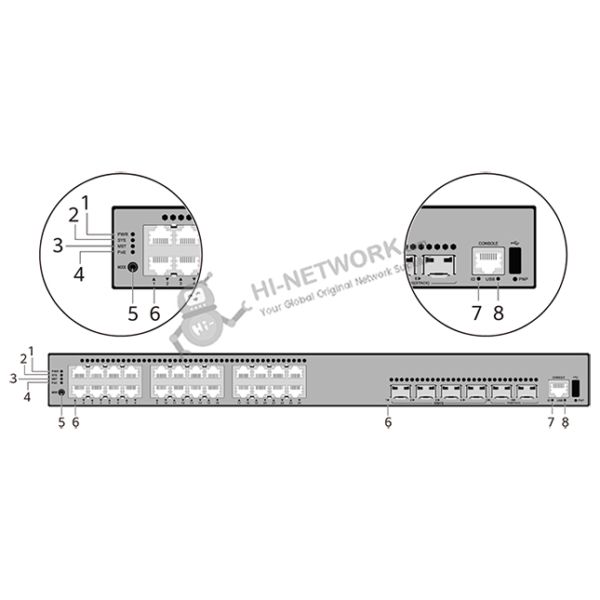
1
|
PWR
|
Power module indicator
|
-
|
Off
|
The switch is powered off.
|
|
Green
|
Steady on
|
The power supply is normal.
|
|
Yellow
|
Steady on
|
The switch has multiple power modules installed. Any of the following situations occurs in a power module slot:
A power module is available in this slot but it is not connected to a power source.
The power module in this slot has failed.
|
|
2
|
SYS
|
System status indicator
|
-
|
Off
|
The system is not running.
|
|
Green
|
Fast blinking
|
The system is starting.
|
|
Green
|
Steady on
|
During the system startup preparation phase, the SYS indicator is steady green, which lasts for a maximum of 30 seconds.
|
|
Green
|
Slow blinking
|
The system is running normally.
|
|
Red
|
Steady on
|
The system does not work normally after registration, or a fan alarm or a temperature alarm has been generated.
|
|
3
|
MST
|
Stack indicator
|
-
|
Off
|
If you are not changing the indicator mode (default): The switch is a standby or slave switch in a stack or the stacking function is not enabled on the switch.
If you are changing the indicator mode: The stack mode is not selected.
|
|
Green
|
Steady on
|
The stack mode is selected. The switch is a standby or slave switch in a stack, and the service port indicators show the stack ID of the switch.
|
|
Green
|
Blinking
|
If you are not changing the indicator mode (default): The switch is the master switch in a stack or a standalone switch with the stacking function enabled.
If you are changing the indicator mode: The stack mode is selected. The switch is the master switch in a stack or a standalone switch, and the service port indicators show the stack ID of the master switch. After 45 seconds, the service port indicators automatically restore to the status mode.
|
|
4
|
PoE
|
PoE indicator
|
-
|
Off
|
The PoE mode is not selected.
|
|
Green
|
Steady on
|
The PoE mode is selected, and service port indicators show the PoE status of each port.
|
|
5
|
MODE
|
Mode switch button
|
-
|
-
|
When you press this button once, the service port indicators change to the stack mode and show the stack ID of the local switch.
When you press this button a second time, the service port indicators change to the PoE mode and show the PoE status of each service port.
When you press this button a third time, the service port indicators restore to the default mode and show the connection status and link activity of each service port.
If you do not press the MODE button within 45 seconds, the service port indicators restore to the default mode. In this case, the PoE indicator is off.
NOTE:
In V600R023C00 and later versions, hold down the mode switch button for 6s and release it to start the web initial login mode. Either of the following situations will occur:
If the switch has no configuration file, the system attempts to enter the web initial login mode.
If the system enters the web initial login mode successfully, the MST mode indicator turn green and stay on for a maximum of 45 seconds.
If the login fails, check whether the device uses factory default settings.
|
|
6
|
-
|
Service port indicator (one indicator for each port)
|
Arrowheads show the positions of ports. A down arrowhead indicates a port at the bottom, and an up arrowhead indicates a port at the top.
|
Meanings of service port indicators vary in different modes. For details, see Table 4-328.
NOTE:
If a power failure occurs on a device's PCB board, indicators of the last four GE, 10GE, or 25GE optical ports on the device's front panel blink green cyclically at an interval of 1 second, with each indicator illuminating for 0.25 seconds.
|
|
7
|
ID
|
ID indicator
|
-
|
Off
|
The ID indicator is not used (default state).
|
|
Blue
|
Steady on
|
The indicator identifies the switch to maintain. The ID indicator can be turned on or off remotely to help field engineers find the switch to maintain.
|
|
8
|
USB
|
USB-based deployment indicator
|
-
|
Off
|
No USB flash drive is installed, or the indicator fails.
|
|
Green
|
Steady on
|
USB-based deployment succeeds. If there is no deployment configuration file, deployment will be repeatedly performed. In this case, the indicator is also steady green.
|
|
Green
|
Blinking
|
USB-based deployment is in progress.
|
|
Red
|
Steady on
|
USB-based deployment fails.
|